Introduction
In the age of globalization, the demand for professional document translation continues to grow. However, high-quality translation requires not only linguistic knowledge but also professional tools to ensure consistency, cost savings, and increased efficiency.
Translation Studios from Sofia Workspace was created to address these challenges - a professional AI translation tool combined with Translation Memory (TM) and review workflow, providing a comprehensive translation solution for businesses and individuals.
Problems That Translation Studios Solves
Challenges in Professional Translation
1. High Translation Costs
Professional translation is often expensive, especially when:
- Having to translate similar content multiple times
- No system to reuse existing translations
- Paying full price for every text segment, even if previously translated
Translation Studios solution: Translation Memory automatically reuses approved translations, reducing costs by 30-70%.
2. Lack of Terminology Consistency
When translating multiple documents:
- Terminology may be translated differently across projects
- Difficult to manage and maintain consistency
- Having to look up terminology repeatedly
Translation Studios solution: TM ensures consistent terminology, Glossary for custom terms.
3. Complex Review Process
Reviewing translations often:
- Takes a lot of time
- Difficult to track progress
- No clear workflow management system
- Hard to store and reuse feedback
Translation Studios solution: Web-based review interface with clear workflow, progress tracking, and TM auto-learning.
4. Format Loss When Translating Files
When translating DOCX, PDF files:
- Formatting is often lost (headings, lists, tables, styles)
- Having to manually reformat after translation
- Wastes time and effort
Translation Studios solution: Fully preserves DOCX formatting, supports Track Changes and Bilingual export.
5. No Support for Long Documents
Translating long documents often:
- Limited by AI token limits
- Loses context when splitting
- Difficult to manage and review
Translation Studios solution: Intelligent chunking with context preservation, automatic long document processing.
Translation Studios: Comprehensive Solution
Feature Overview
Translation Studios is an integrated tool with all the features needed for professional translation:
"Professional AI translation with Translation Memory, review workflow, and format preservation."
3 Main Modules
1. Translation Module - Create & Manage Translations
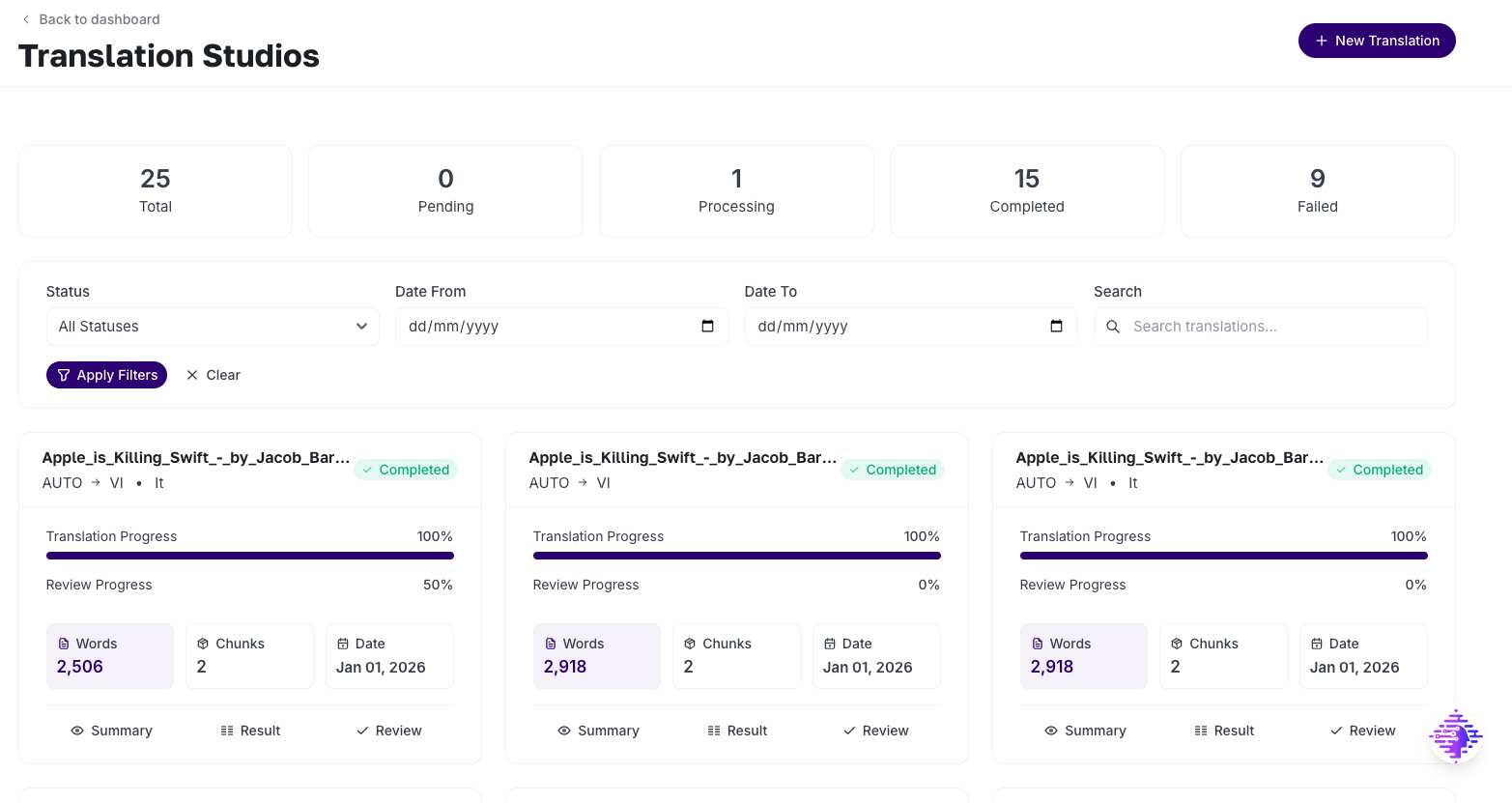 Translation list with filters and statistics
This module helps you create and manage translations:
- Text Translation: Translate text directly, supports long text with intelligent chunking
- File Translation: Upload and translate DOCX, PDF, TXT, MD files with format preservation
- Settings Configuration: Choose language, tone, domain, and glossary
- Progress Tracking: Track real-time progress with chunk processing status
- TM Integration: Automatically search and reuse from Translation Memory
Use Case
You need to translate a 50-page legal contract from English to Vietnamese. Translation Studios will automatically split the file into chunks, translate each chunk with TM lookup, and fully preserve formatting (headings, tables, styles).
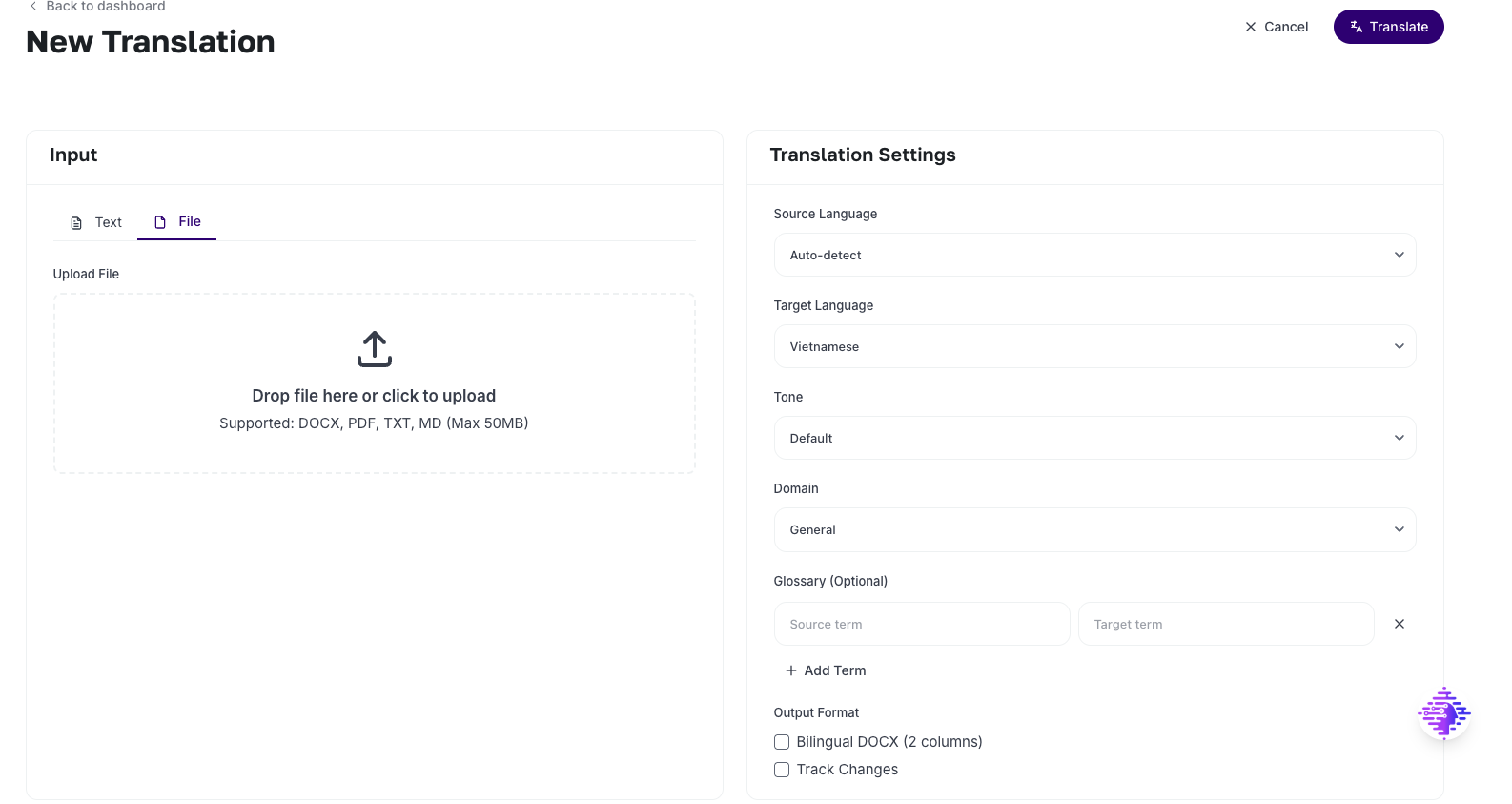 Create new translation form with Text/File tabs and Settings panel
2. Review Module - Approve & Edit
This module provides professional review tools:
- Side-by-Side Comparison: Compare original and translated versions side by side
- Status Badges: Indicates translation source (TM Exact, TM + AI, AI Full)
- Review Actions: Approve, Edit, Reject, Comment
- Progress Tracking: Track review progress in real-time
- TM Auto-Learning: Automatically saves approved/edited translations to TM
Use Case
You are a reviewer and need to review a contract translation. Translation Studios displays each chunk with a status badge (🟢 TM Exact can be quickly approved, 🔵 AI Full needs careful review). You approve/edit/reject each chunk, and the system automatically saves to TM.
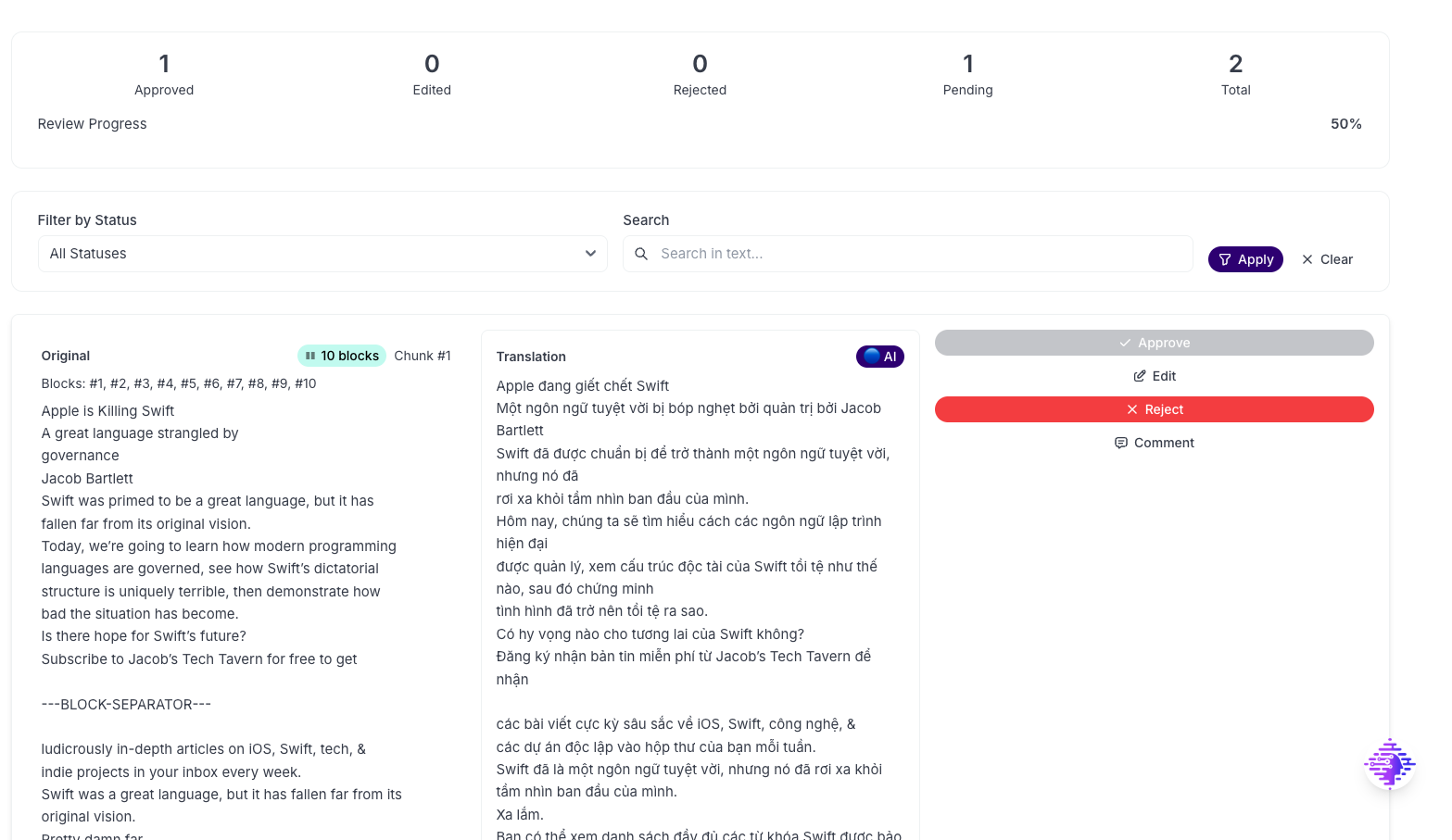 Review interface with side-by-side comparison and review actions
3. Export Module - Multi-Format Export
This module allows exporting translations in multiple formats:
- DOCX: Microsoft Word with full format preservation
- Markdown: Markdown format for documentation
- HTML: HTML document with styling
- JSON: Structured data for integration
- TXT: Plain text format
- Bilingual DOCX: 2-column layout (Original | Translation)
- Track Changes: Highlight translated content in Word
Use Case
After completing the review, you need to export the translation. Translation Studios allows exporting DOCX with Track Changes so clients can review in Word, or export Markdown for documentation websites.
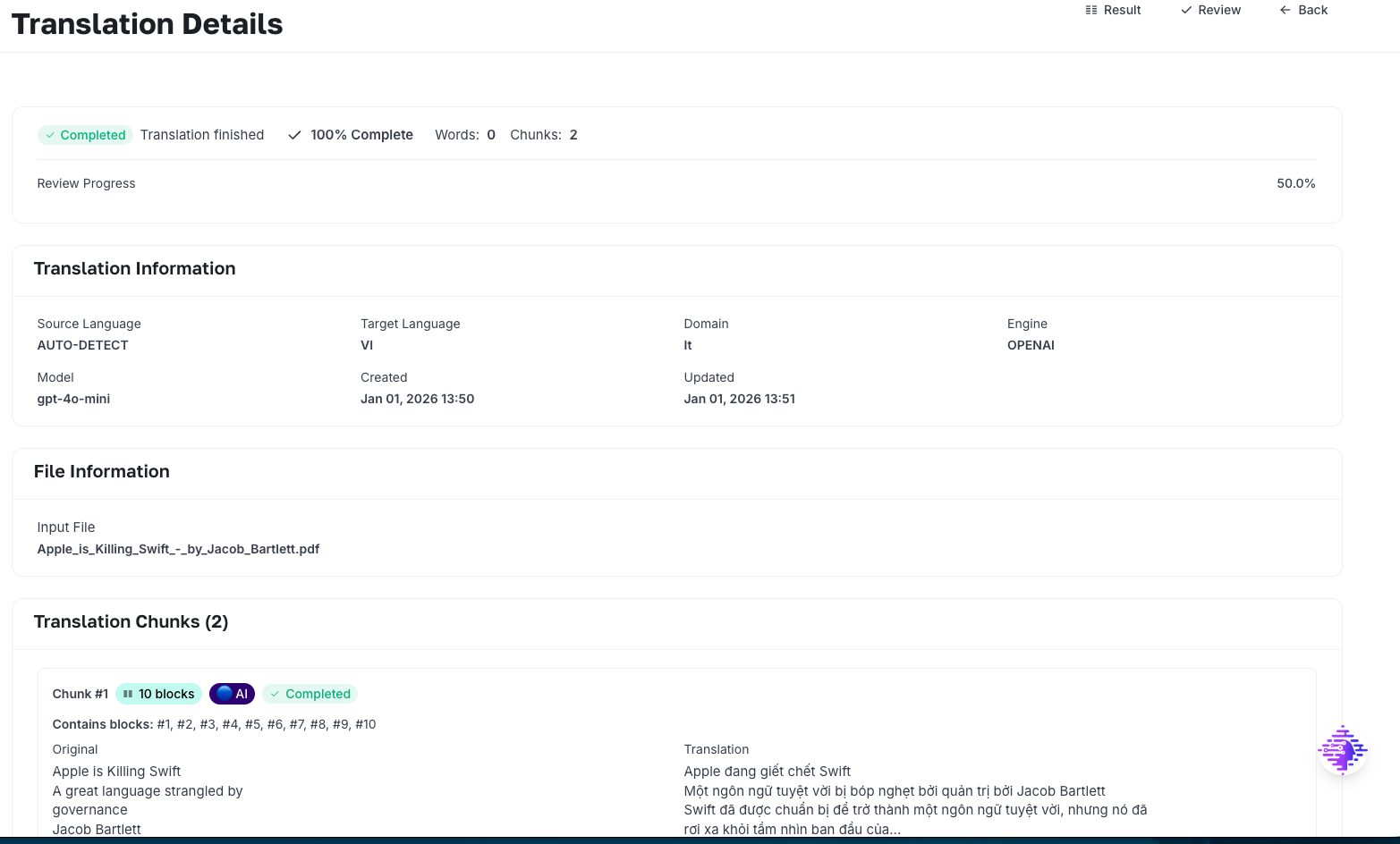
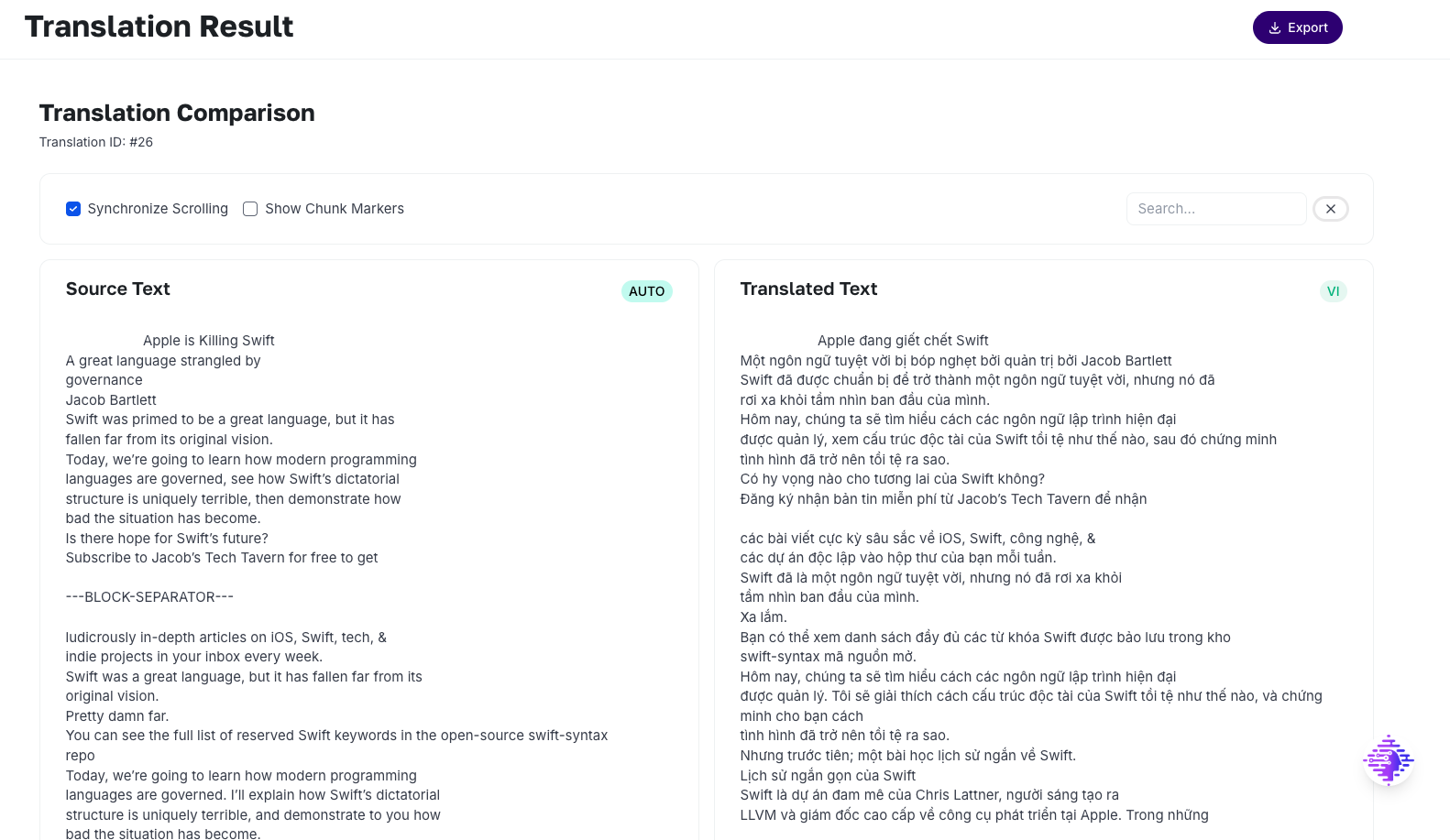 Translation result page with detail, chunks list, and download options
Key Features
1. Translation Memory (TM) - The Heart of the System
Translation Memory is a database that stores approved translations. When translating new text, the system automatically searches TM for reuse.
TM Match Types
| Match Type | Similarity | Action | Cost | Status Badge |
|---|---|---|---|---|
| Exact Match | 100% | Use directly from TM | $0 (Free) | 🟢 TM Exact |
| Near Match | ≥95% | Use directly from TM | Minimal (10%) | 🟢 TM Near |
| Fuzzy Match | 85-94% | AI refine from TM | Reduced (30%) | 🟡 TM + AI |
| No Match | <85% | Translate fully with AI | Full (100%) | 🔵 AI Full |
TM Benefits
- Cost Reduction: 30-70% reduction in translation costs
- Consistency: Ensures consistent terminology across projects
- Quality: Improves over time as more approved translations are added
- Speed: Faster translation with TM reuse
2. Intelligent Chunking - Long Document Processing
The system automatically splits long documents into intelligent chunks:
- Semantic Block Preservation: Never splits in the middle of sentences
- Max Chunk Size: ~9,000 characters (~1,500-3,000 tokens)
- Structure Awareness: Preserves document structure (headings, paragraphs, lists)
- Context Preservation: Maintains context between chunks using summarization techniques
Chunking by File Type:
- Plain Text: Split by paragraphs and sentences
- DOCX: One chunk per block (paragraph, heading, list item, table cell)
- Markdown: Split by markdown blocks (headings, paragraphs, lists)
- PDF: Split by paragraphs and sections
3. DOCX PRO Processing - Full Format Preservation
Translation Studios fully preserves DOCX formatting:
- ✅ Headings: All heading levels (H1-H6)
- ✅ Lists: Bullet and numbered lists with correct nesting
- ✅ Tables: Accurate row/column structure, supports nested tables
- ✅ Hyperlinks: URLs and link text preserved
- ✅ Text Styles: Bold, italic, underline, color, font size, font family
- ✅ Run-Level Style: Formatting within paragraphs (mixed styles)
- ✅ Track Changes: Highlight translated content in Word
- ✅ Bilingual Layout: 2-column layout (Original | Translation)
4. Multi-Format Export - Flexible File Export
Supports exporting to multiple formats:
- DOCX: Microsoft Word with metadata table
- Markdown: Markdown format with YAML front matter
- HTML: HTML document with responsive styling
- JSON: Structured data with full metadata
- TXT: Plain text with formatted header
5. Reviewer Workflow - Professional Review Process
Web-based review interface with:
- Side-by-Side Comparison: Original and translated versions side by side
- Status Badges: Indicates translation source (TM Exact, TM + AI, AI Full)
- Review Actions: Approve, Edit, Reject, Comment
- Progress Tracking: Track progress in real-time
- TM Auto-Learning: Automatically saves approved/edited to TM
6. Transparent Billing - Clear Cost Breakdown
 Billing Summary with cost breakdown and TM reuse statistics
Clear cost breakdown:
- TM Exact: $0 (free)
- TM Near: Minimal (10% of full cost)
- TM + AI: Reduced (30% of full AI cost)
- AI Full: Standard AI pricing (100%)
Billing summary displays:
- Total words
- TM reuse percentage
- Credit breakdown
- Words credit consumed
Benefits of Translation Studios
For New Users
- Easy to use: Intuitive interface, no deep knowledge of CAT tools required
- Quick learning: See how TM works to understand best practices
- Time saving: From file upload to ready translation in just minutes
- Full support: Detailed guides and troubleshooting
For Experienced Users
- Professional optimization: TM and AI refinement for high quality
- Review workflow: Professional review process with side-by-side comparison
- Efficient management: Store and manage all translations
- Credit savings: TM reuse significantly reduces costs
For Businesses
- Quality standardization: Review workflow ensures consistent quality
- Easy sharing: Centralized TM, easy to share within team
- Progress tracking: View history and translation progress
- Best practices: Learn from the best translations in the team
- Cost management: Transparent billing with detailed breakdown
For Professional Translators
- Increased productivity: TM reuse helps translate faster
- High quality: AI + human review ensures accuracy
- Project management: Store translations by project, easy to retrieve
- Skill enhancement: Learn from AI suggestions and TM matches
Comparison with Other Solutions
Translation Studios vs. Manual Translation
| Criteria | Manual Translation | Translation Studios |
|---|---|---|
| Time | 1-2 hours/page | 2-5 minutes/page |
| Cost | High (full payment required) | 30-70% reduction (TM reuse) |
| Consistency | Depends on translator | Guaranteed (TM + Glossary) |
| Review workflow | Manual, difficult to manage | Web-based, systematic |
| Format preservation | Must reformat | Automatically preserved |
| TM | None | Yes, auto-learning |
Translation Studios vs. Traditional CAT Tools (Trados/MemoQ)
| Criteria | Trados/MemoQ | Translation Studios |
|---|---|---|
| Web-Based | ❌ Desktop only | ✅ Web-based |
| AI Integration | ⚠️ Plugin required | ✅ Native |
| TM Auto-Learning | ⚠️ Manual | ✅ Automatic |
| Cost Transparency | ⚠️ Limited | ✅ Detailed |
| Format Preservation | ✅ Yes | ✅ Advanced |
| Review Workflow | ✅ Yes | ✅ Built-in |
| Setup Time | ⚠️ Complex | ✅ Simple |
Translation Studios vs. Simple Translation APIs
| Criteria | Simple API | Translation Studios |
|---|---|---|
| Long Text | ⚠️ Limited | ✅ Intelligent chunking |
| File Support | ❌ Text only | ✅ DOCX/PDF/TXT/MD |
| TM | ❌ None | ✅ Full TM |
| Review | ❌ None | ✅ Workflow |
| Cost Optimization | ❌ AI only | ✅ TM + AI |
| Format Preservation | ❌ None | ✅ Advanced |
Real-World Use Cases
1. Enterprise Legal Documents
Problem: Company needs to translate legal contracts with high consistency
Solution with Translation Studios:
- Upload DOCX contract file
- Select "Legal" domain
- Add glossary with legal terminology
- Translate with Bilingual DOCX export
- Review each chunk carefully
- Export final with Track Changes
Result:
- Consistent legal terminology
- Bilingual format for legal review
- Track Changes for audit trail
- 50-60% cost savings thanks to TM
2. Technical Documentation
Problem: Translate software technical documentation with specialized terminology
Solution with Translation Studios:
- Upload Markdown or DOCX file
- Select "IT/Software" domain
- Add glossary with technical terms
- Translate and review
- Export Markdown for documentation
Result:
- Preserves markdown structure
- Consistent technical terminology
- Format suitable for documentation
- TM learns from approved translations
3. Marketing Content
Problem: Translate marketing content for website with appropriate tone
Solution with Translation Studios:
- Upload file or enter text
- Select "Marketing" tone
- Select "Marketing" domain
- Translate and review
- Export HTML for website
Result:
- Appropriate marketing tone
- HTML format ready for web
- Quick and efficient
- TM reuse for similar content
4. Medical Documents
Problem: Translate medical documents with accurate terminology
Solution with Translation Studios:
- Upload DOCX file
- Select "Medical" domain
- Add glossary with medical terms
- Review carefully with medical expert
- Export DOCX with metadata
Result:
- Accurate medical terminology
- Review workflow ensures quality
- Complete audit trail
- TM ensures consistency
Typical Workflow
Workflow 1: Simple Text Translation
- Create new translation: Click "New Translation"
Create translation form with Text/File tabs and Settings panel
- Select "Text" tab: Enter or paste text
- Configure settings: Choose language, tone, domain
- Add glossary (if needed): Add custom terminology
- Click "Translate": System processes automatically
- Track progress: View progress on detail page
Result page with detail, chunks, and billing summary
- Review (if needed): Approve/Edit/Reject chunks
- Export: Export file in desired format
Time: 2-5 minutes from text to ready translation
Workflow 2: Professional DOCX File Translation
- Create new translation: Click "New Translation"
- Select "File" tab: Upload DOCX file
- Configure settings: Choose language, tone, domain
- Output options: Select Bilingual and Track Changes (if needed)
- Click "Translate": System parses file and creates chunks
- Track progress: View chunk processing status
- Review carefully: Review each chunk with side-by-side comparison
Review interface with side-by-side comparison and review actions
- Export DOCX: Export DOCX file with full formatting
Time: 5-15 minutes depending on file length and number of chunks
Workflow 3: Review & Approval
- Open translation: Click on translation card from list
Translation list with translation cards
- Click "Review": Open review interface
- Review each chunk:
- 🟢 TM Exact: Quick approve (usually accurate)
- 🟡 TM + AI: Quick review (AI refined from TM)
- 🔵 AI Full: Careful review (fully AI translated)
- Take action: Approve/Edit/Reject/Comment
Review interface with progress tracking and chunk review list
- Track progress: View review progress
- Export final: When all chunks are approved/edited
Billing summary displayed after completion
Time: 10-30 minutes depending on length and complexity
Conclusion
Translation Studios is not just a translation tool - it's a complete ecosystem for professional translation. From beginners to experts, from individuals to businesses, Translation Studios provides the tools needed for efficient, cost-effective, and quality-assured translation.
Why Choose Translation Studios?
- Comprehensive: All necessary tools in one place
- Smart: AI + TM automatically optimizes and improves
- Professional: Review workflow and format preservation
- Easy to use: Intuitive interface, web-based
- Efficient: Saves 30-70% on costs and time
- Flexible: Supports multiple formats and export options
Get Started Today
No deep knowledge of CAT tools required. Just have a file or text to translate, and Translation Studios will help you translate professionally with high quality and optimal cost.
Access Translation Studios now:
- • Log in to Sofia Workspace
- • Navigate: Dashboard → Translation Studios
- • Or access directly:
/dashboard/user/translation-studios
Translation Studios - Where Translation Becomes Art
Transform your documents into professional translations with Translation Studios.